
FeaturesAI
AI
Agents that do advisor work inside guardrails you set — with a full audit of every action they take.
Introduction & purpose
Most of an advisor's week is not advice. It is preparing for meetings, writing up what was said afterwards, filling in flows, fetching numbers from other systems and keeping the client record straight. The platform's agents take that work on.
They work inside the same guardrails as everyone else, and here the guardrails are code, not instructions. In most AI tools for advisors, the rules are a skill or a prompt: text the model is asked to follow, and usually does. In a highly regulated industry, usually is not good enough. In the platform, an agent works through the same flows and the same checks as an advisor. A portfolio outside the client's risk bounds is stopped by the platform, not by the model's judgement; a tool the agent has not been given does not exist for it; a step it has no right to take cannot be taken. An instruction can be misread, or talked around. A check in code runs the same way every time.
They start from the client's own history — notes, transcripts, documents, the whole file — so they rarely need to ask for what you already hold. And every action is logged: what the agent did, which tools it used, and how it got from A to Z, so your compliance function can see afterwards exactly what happened.
What the front office gets back is time. The agents are part of how the platform works, not a layer bolted on top of it, so the hours they save come out of administration rather than out of advice.
Guardrails
Compliance by design carries over to the agents. In practice that means four things:
- Tools — each agent has a set of tools that give it what it needs to do its tasks, and at the same time keep it working within your bounds.
- The same checks — an agent fills in flows through the same validation as an advisor — risk bounds, the client's capacity, suitability — so what it proposes is checked like anything else.
- Advisors in the loop — the agents prepare and complete the work; your advisors oversee it and verify the result.
- A full trail — every action is recorded: what the agent did, which tools it used, and the path it took to get there.
The different agents
There are two built-in agents in Quantfolio Platform.
- Global Agent — access to all clients, with dedicated tools for getting an overview of your organisation's activities and generating stats, prepping the advisor's week, prospecting new clients, and keeping track of the organisation as a whole.
- Client Agent — access to one client at a time, with tools for filling flows, logging activities, creating portfolios, prepping client meetings, and analysing the client's existing positions.
Agent workflows
The real benefits and efficiency gains from the agents come when you set them in a system. We have built functionality for:
- Predefined prompts — ensure consistency and reduce time spent prompting for recurring tasks.
- Scheduled tasks — run agentic tasks at a given time and frequency during the week.
- Event-based tasks — build real agentic workflows, with the agents performing tasks when certain events occur.
At the same time, the agents keep the flexibility to perform ad hoc prompting when you need it.
Agent audit trail
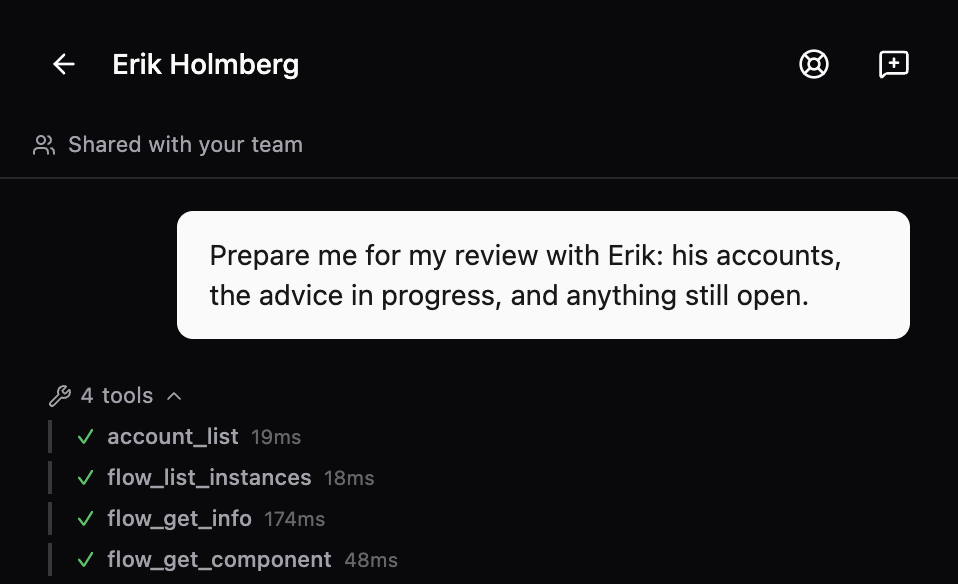
Every piece of work an agent does leaves a record you can open and read afterwards. Not a summary the agent wrote about itself, but what actually ran:
- The request — the question or task that started the work, as it was asked.
- The tools — every tool the agent called, in order, with whether it succeeded and how long it took.
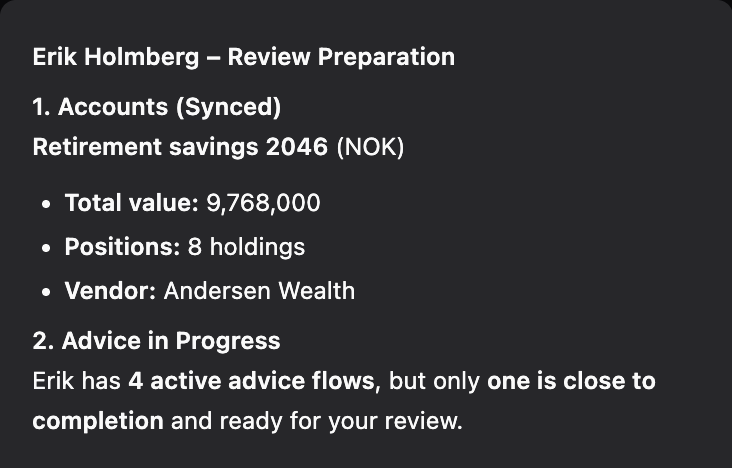
- The result — the answer and the work the agent produced, exactly as the advisor saw it.
- The run — the model and provider it ran on, the tokens it used, the time it took and what it cost.
The conversation stays on the client and is shared with your team, so a colleague picking the client up — or your compliance function checking the work — can follow what was done, and how.

AI models
The platform is AI-agnostic. Use the models that come with it, or connect your own provider with your own keys, such as OpenRouter, Azure OpenAI or any other OpenAI-compatible API. The models that come with the platform are all routed through the EU:
- ClaudeAnthropic
- Claude Sonnet 4.6
- Claude Opus 4.8
- Claude Opus 4.7
- Claude Haiku 4.5
AWS Bedrock, Stockholm. Sonnet and Haiku also on Google Vertex, Belgium, for failover.
- GPTOpenAI
- GPT-5.5*
- GPT-5.4*
- GPT-5.1
- GPT-5 mini
- GPT-5 nano
- GPT-4.1
- GPT-4.1 nano
Microsoft Azure, Sweden Central.
- GeminiGoogle
- Gemini 2.5 Pro*
- Gemini 2.5 Flash*
Google Vertex, Finland.
- MistralMistral AI
- Mistral Large 3
- Mistral Medium 3.5
- Mistral Medium 3.1
- Mistral Small 4
- Ministral 3 14B
Mistral's own platform in the EU. Medium 3.5 on Scaleway, EU.
- MoreAlibaba · Zhipu · OpenAI · Meta · MiniMax
- Qwen 3 235B
- GLM 5.2
- GPT-OSS 120B
- Llama 3.3 70B
- MiniMax M2.5
Scaleway, EU. Llama 3.3 and MiniMax through EU providers, routed by Requesty.
* Routed through an EU region, but classified as global by the upstream provider, so EU data residency is not contractually guaranteed. Avoid these for work with hard data-residency requirements.
Out of the box, agents run on Claude Sonnet 4.6, and translations and summaries on Claude Haiku 4.5. Both run on two EU clouds and switch over automatically if one of them fails. The same failover is available for Mistral Large, Medium and Small, and for Llama 3.3.
You choose the default model for agent work and a lighter one for translations and summaries, which keeps token costs under control. Models you don't want offered can be switched off, and advisors can pick a model per chat.
Note that the performance of the agents depends on the models you use. We are happy to discuss this with you and guide you on the way.
Quantfolio Platform MCP
Our system comes with a built-in MCP server, so you can operate the platform through your own agents — inside the same guardrails that apply to everyone else.
Erik Holmberg wants to invest NOK 2.4 million for his retirement, all of it in SKAGEN Kon-Tiki. Log a meeting note, start an advice flow in Quantfolio Platform and fill it in.
Thought for 2s
Quantfolio Platform5 tools
- Find clientErik Holmberg
- Log meeting noteRetirement planning
- Start flowInvestment Advice
- Fill goalRetirement savings 2046 · NOK 2,400,000
- Fill portfolioRisk bounds breached · equity 100%, max 52%
The meeting is logged, and Erik's Investment Advice flow is started with his retirement goal filled in.
The portfolio is on hold. A single equity fund is outside the risk bounds for Erik's risk score — equity 100% against a maximum of 52% — and the platform will not take it from me. An advisor needs to adjust it, or accept the deviation with a justification that goes into the report. Shall I propose a portfolio within his bounds instead?
Connect your other systems
Each advisor can connect their own tools, so the agents work with the context the advisor already has. Connections are personal: only the person who set one up can see it.
- Email (IMAP) — the agent reads the conversation with the client and drafts replies in your mailbox. It only sees messages to and from the client you're working on, only drafts to that client, and never sends anything.
- Notion — add your Notion API key, and the agent can search your workspace, read pages, and query and update databases.
- MCP servers — any system that exposes an MCP server, your own or a vendor's, can be added with an API key or a sign-in, and its tools become available to the agents.
The agents also use the platform's own integrations, such as company data from ENIN and screening from Trapets.
More connectors are on the way. If there's a system you want the agents to reach, tell us.