
Quantfolio
How it works
Wealth managersHybrid advisory for private banking at scaleBanksAdvice and savings across the retail bankInsuranceSavings and pension products, automated
PartnersBlogBook a demo
How it works
Who it's for
Wealth managersBanksInsurance
PartnersBlogBook a demo
Quantfolio
Company
AboutContactBook a demoPartners
Who it's for
Wealth managersBanksInsurance
Resources
How it worksAIBlogPrivacy PolicyTerms of Use
© 2026 Quantfolio AS·Org. nr. 915 210 600·Page updated 28 September 2026
FeaturesAccounts and orders
  • Overview
  • The platform
  • Clients
  • Flows
  • Investment engine
  • PDF templates
  • Accounts and orders
    • Introduction & purpose
    • Working with your other systems
  • Integrations
  • AI
  • Compliance
  • 3rd party solutions
  • FAQ
  • Overview
  • The platform
    • Introduction & purpose
    • One platform — five ways to operate it
    • Get started
  • Clients
    • Client types
    • Client information
    • Client activities and data
    • Accounts and orders
    • Documents
    • Lookups and flow logic
  • Flows
    • Introduction to flows
    • How flows are built
    • Pages — internal vs public
    • Components
    • Flow examples
  • Investment engine
    • Introduction & purpose
    • Portfolio collection
    • Datasets and calculations
    • Risk models
    • Financial situation models
    • Portfolios and portfolio modes
  • PDF templates
    • Introduction & purpose
    • Commonly used templates
    • Signing
  • Accounts and orders
    • Introduction & purpose
    • Working with your other systems
  • Integrations
    • Introduction & purpose
    • Commonly used integrations
  • AI
    • Introduction & purpose
    • Guardrails
    • The different agents
    • Agent workflows
    • Agent audit trail
    • AI models
    • Quantfolio Platform MCP
    • Connect your other systems
  • Compliance
    • Introduction & purpose
    • Suitability
    • KYC and AML
    • Flow approvals
    • Flows review
    • Audit trail
  • 3rd party solutions
    • Introduction & purpose
    • Morningstar
    • Idura (formerly Criipto)
    • Trapets
    • ENIN — company lookups
    • Sumsub — identification
    • Whereby — meeting links and transcription
  • FAQ
    • Clients and your CRM
    • Product data
    • Accounts and orders
    • AI guardrails
  1. How it works
  2. Accounts and orders

Accounts and orders

Accounts, mandates, saving plans and orders that follow the client across the whole relationship.

Introduction & purpose

Accounts are where a client's money sits; orders are how it gets there. The platform has both built in, so advice does not stop at a recommendation:

  • Accounts — hold the client's positions and cash. Each account carries the vendor it came from and an external ID, so it matches the account in your own systems, and it can be linked to the goal it serves.
  • Mandates — the terms an account is managed under, for discretionary clients.
  • Saving plans — the client's recurring contributions into an account, and the products they go into.
  • Orders — generated from the advice: each product with its target amount, buy or sell, and a status as it is executed.
  • Wrapper types — decide which account a product can be held in, so the platform allocates products to the right account automatically.

When the client signs, the flow produces all of it in one step: the account is created or updated, and the orders, the saving plan and any recurring orders are generated against it.

Each client can own one or more accounts, which you use to follow the client across the life span of the relationship.
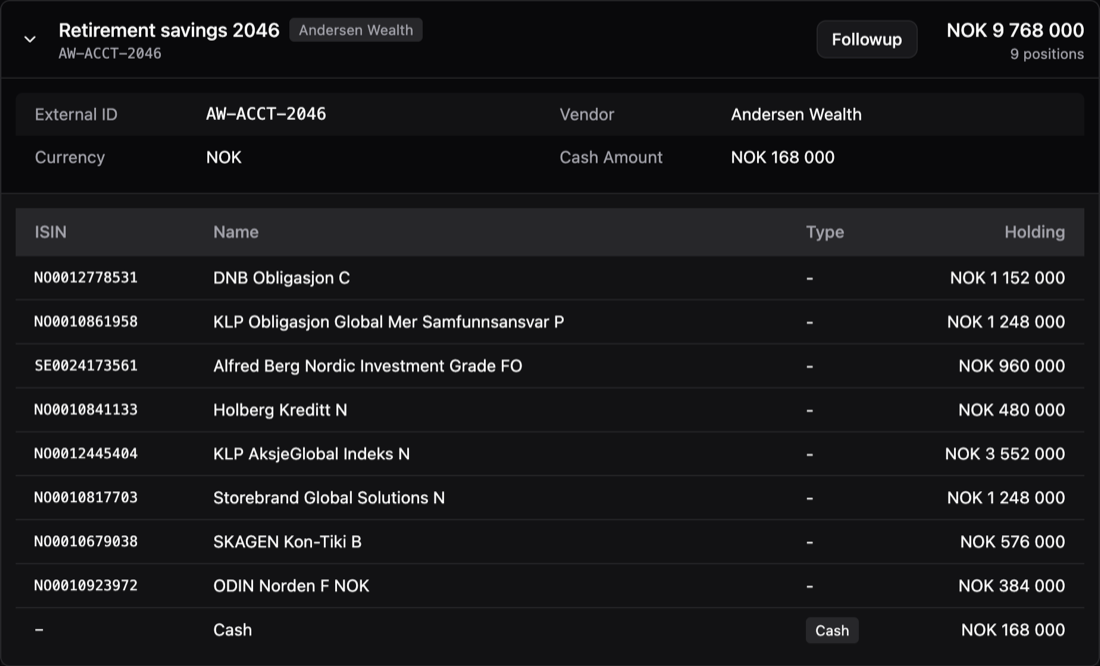
An account named Retirement savings 2046 from vendor Andersen Wealth, external id AW-ACCT-2046, holding NOK 9,768,000 across eight funds with their ISINs, plus NOK 168,000 in cash.
A client account in the platform: the funds it holds with their ISINs and amounts, the cash beside them, and the vendor and external id that match it to the same account in the firm's own systems. This one is named for the client's retirement goal and holds NOK 9.9 million.

Working with your other systems

Accounts and orders are built to meet the systems you already run, in both directions:

  • Accounts in — an account can be created by a flow in the platform, or mirrored from your portfolio management system with its positions and cash. The vendor and the external ID on every account keep the two matched.
  • Orders out — orders are available over the API to whatever executes them — an order management system, a custodian, or your core banking platform — and each order keeps its status, so the outcome of the advice stays visible on the client.
  • Movements in one place — your advisors follow and manage account movements where they already work, rather than in a separate system.
Quantfolio PlatformFlowAccountOrdersYour systemsOrder managementCustodianPortfolio managementOrders outbuy · sell · switchAccounts backpositions · cashEach order keeps its status — pending until it is executedQuantfolio PlatformFlowAccountOrdersYour systemsOrder managementCustodianPortfolio managementOrders outbuy · sell · switchAccounts backpositions · cashEach order keeps its status— pending until it is executed
What crosses the boundary between the platform and the systems you already run. Orders leave the platform for whatever executes them — an order management system, a custodian, a core banking platform — as buys, sells and switches. What the client ends up holding comes back the other way, onto the account: positions and cash. Each order keeps its status, so the outcome of the advice stays visible on the client.